
URL Lister - Firefox Plugin

URL Lister Logo

URL Lister is a Firefox Plugin that shows the URLs of all the open tabs in a textarea so that it can be copied easily.

Download/Install

Install URL Lister

If you have installed it, consider rating it or reviewing it at Firefox plugins sandbox. Go to the public page for URL Lister and write a review for the application. I need reviews to promote it to the main extensions page - sandbox plugins are for registered users only.

Usage

Lets say you have these four tabs open...

Right click any tab and click on the 'URL Lister...' to open up the main dailog. You can also use 'Tools > URL Lister'. You will find the URLs of all the open tabs there.
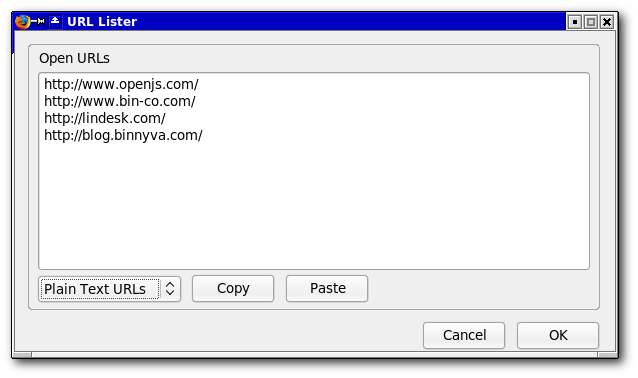
URL Lister Screenshot

There is a drop down menu at the bottom - it has these three options...

Plain Text

The first option will display just the URLs - like this...

http://www.openjs.com/
http://www.bin-co.com/
http://lindesk.com/
http://blog.binnyva.com/

HTML Anchors

The second option will create HTML Links with a <br /> tag at the end of each line - like this...

<a href="http://www.openjs.com/">OpenJS - JavaScript, Opened.</a><br />
<a href="http://www.bin-co.com/">Bin-Co</a><br />
<a href="http://lindesk.com/">LinDesk</a><br />
<a href="http://blog.binnyva.com/">BinnyVA</a><br />

It will use the title of the tab as the link text. You can use this code directly in any HTML page.

OpenJS - JavaScript, Opened.
Bin-Co
LinDesk
BinnyVA

Linked List

The final option will create a <ul> list with the links of all the open tabs - something like this...

<ul>
<li><a href="http://www.openjs.com/">OpenJS - JavaScript, Opened.</a></li>
<li><a href="http://www.bin-co.com/">Bin-Co</a></li>
<li><a href="http://lindesk.com/">LinDesk</a></li>
<li><a href="http://blog.binnyva.com/">BinnyVA</a></li>
</ul>

Open URLs

If you have a list of URLs and want to open them all, all you have to do is copy those URLs into this dialog and press OK - this will open up all the given URLs.

Comments

Anonymous at 17 Jun, 2008 08:11
works perfect!
It was just what I was looking for!. (I needed a quick way to copy lots of URLs opened in tabs, so I can feed a script with them...)
Reply to this.
Anonymous at 26 Jul, 2008 03:01
Is now showing up in Firefox 3 as 'Not compatible with Firefox 3.01'

Any plans to update this?
Reply to this.
Binny V A at 11 Aug, 2008 01:35
Updated - sorry it look this long.
Reply to this.
Anonymous at 02 Oct, 2008 08:03
Window Key for Url List ?
Reply to this.
Anonymous at 13 Feb, 2009 02:01
I have been wanting a firefox extension that can do the following. Say I have 10 tabs. I want to create a new window with tabs 5-10, then delete tabs 5-10 from the current window. The result is two windows, one with tabs 1 - 4, and another with tabs 5 - 10 (from the original 10 tab window). Essential split the window in two. Maybe it could work by right click on a tab and select an option like "split into new window ...". Seems like URL Lister has some of the functions needed to do what I want. I could list the 10 URLs for the 10 tabs. The delete the first N URLs, then open the remaining URLs (10 - N) in a new window, where N = 4 in my example above. Have you considered making such an extension (or enhancement to URL Lister)?
Reply to this.
Anonymous at 22 Feb, 2009 08:18
Hi,

I downloaded your plug in to try it. I wanted to be able to open a list of urls by cutting and pasting into your window as described. It doesn't work for the url's if they don't have the www. prefix.

Is it possible for you to automatically add the http:// for lines where it doesn't exist? You could test for it's presence, then append OR, Firefox 3 is smart enough to recognize it, but your plug in won't open the tab unless it sees the prefix. Maybe you could simply open a tab for each entry regardless of the format. Worst case would be that urls that didn't resolve would receive a error.

To summarize, i'm suggesting you open a tab for each line, with whatever is in that line. If you do that, i'll be sure to write a glowing review.

This has the start to being a great plugin.
Keep up the great work.
Reply to this.
Anonymous at 22 Feb, 2009 08:21
UPDATE TO LAST POST. The comments software you're using perverted my text above, and obfuscated a critical piece of my information. I will rewrite it here with spaces between each character. You need to remove the spaces:

"it doesn't work for the url's if they don't have the: h t t p : / / w w w . prefix. "

Thanks and sorry for the confusion.
Reply to this.
George Baily at 02 Jun, 2009 07:25
This is an absolute MUST HAVE plugin for SEO type people. I am constantly creating csv's of URLs to research / submit content to, and it's such a time saver just to dump in a whole list of URLs to open.

Other uses I love it for:
* dump in a text file containing scattered URLs, it ignores all the text and only opens the URLs
* batch editing of website "backend" pages, where only one variable in a URL changes like a product ID or post ID, create the sequence of pages using excel and then open loads at a time, and log progress in excel
Reply to this.
Panama at 21 Jul, 2009 06:16
Hi, please update this wonderful plugin for Firefox 3.5!
Reply to this.
Anonymous at 17 Aug, 2009 12:01
Great Addon. The "Open URLs" box is a good size but it doesnt *resize* with the window. Not a big deal but annoying with 100+ tabs.
Reply to this.
Mardeg at 03 Sep, 2009 02:32
Anyone with ChatZilla already installed can do the alias command in my link then do either /session or /session bak to view tab links from this or last session
Reply to this.
Anonymous at 17 Sep, 2009 10:21
Can you add an option to include the url of tabs in all windows vs. the current window. When there are multiple windows open may have the output include a blank line or new <ui> at the start of the url lists for the various currently open windows?
Reply to this.
heikoo at 22 Oct, 2009 01:53
thanks a lot. it's just what i was looking for for months.
works great with ubuntu 8.10 FF 3.0
Reply to this.
Anonymous at 14 Nov, 2009 06:26
Great addon, thank you! I echo the request to include the option of listing urls of windows as well as tabs.
Reply to this.
Anonymous at 15 Nov, 2009 05:34
Oh and another thing; extra option of listing "back" urls, and further maybe the extra option to signify the currently activated page as well:

first url
url
url
<activated page> marking it with a star or brackets or similar
url
url
Reply to this.
Anonymous at 16 Nov, 2009 11:01
how to get these url to my java program running in the current machine.?
Reply to this.
abhilash at 12 Dec, 2009 09:54
hey now mozzila labs have released API's just to write addons, its api for almost 90% of current add-ons, its called jetpack, refer https://jetpack.mozillalabs.com/ , maybe very usefull to you i guess.........
Reply to this.
Peter at 29 Jan, 2010 11:59
Great add-on.
But please update for 3.6/3.7... ;)
Reply to this.
bius at 31 Jan, 2010 10:59
your addon is very usefu for me, but please update for better compatibility with FF 3.6
Reply to this.
Anonymous at 31 Jan, 2010 08:46
Yes, I have delayed switching over to FF3.6 waiting for your updated add-on :). Is there anyway you can submit this to Mozilla for them to add it in as a perm feature?
Reply to this.
Kegel8 at 04 Feb, 2010 01:56
Many Thanks for this add-on, please update to FX-3.6/3.7
Reply to this.
Anonymous at 05 Feb, 2010 08:44
Can you update for 3.6?
Reply to this.
hstooh at 06 Feb, 2010 07:00
It work FF3.6 Firs instal Url lister .xpi file open it with any zip soft, open
"install.rdf" file with notepad and change 3.5.* to 3.6.* save it and send "install.rdf" file to zip and install it works
by blackseastar on February 4, 2010
Reply to this.
Anonymous at 08 Feb, 2010 03:20
I dont understand these instructions. Maybe its because I am on Mac.
Reply to this.
url_lister_fan at 17 Mar, 2010 02:38
Hello Anonymous 8)

Perhaps this explanation will help you to apply the advice hstooh gave us within the context of the MAC?

When using Firefox it is possible to mouse point to a download link so as to "download it to" a self-chosen location.

Having done so, the result at that location is the creation of a file (at least that is the case at a Windows PC called "linkname.xpi".

Thus I downloaded the file, "url_lister-1.2-fx.xpi".

What hstooh has suggested ist that we
(1) unpack that archive file, resulting in the following two subdirectories and the following two files being created within a new directory, in my case using 7zip to unpack the archive I thus created the directory...:
D:\url_lister-1.2-fx
containing the following two subdirectories...:
chrome
defaults

and two files...:
chrome.manifest
install.rdf

(2) that last named file, "install.rdf", is best opend not with notepad but rather with the Windows native *.rdf-file editor, WordPad.

Using WordPad to open that file, there can be found with it a line that mentions a "max version".
[quote]
/</em:homepageURL>
<em:iconURL>chrome://urllister/skin/images/icon32.png</em:iconURL>
<em:optionsURL>chrome://urllister/content/options.xul</em:optionsURL>

<!-- Target Application this extension can install into,
with minimum and maximum supported versions. -->
<em:targetApplication>
<Description>
<em:id>{ec8030f7-c20a-464f-9b0e-13a3a9e97384}</em:id>
<em:minVersion>1.0+</em:minVersion>
<em:maxVersion>3.9.*</em:maxVersion>
</Description>
</em:targetApplication>
</Description>
</RDF>
[/quote]

As can be seen, I have already edited that line to indicate that the Firefox version "3.9.*" be the maxVersion capable of using the "url lister" extension.

I then took the two directories and the two files and using 7zip packed them into a new archive, "Firefox_addons.7z".

That archive I renamed to "url_lister-1.2-fx.xpi". Then I opened the archive using Firefox, which resulted in the successful installation of "url_lister" into my current Firefox version,
[quote]
Mozilla/5.0 (Windows; U; Windows NT 5.1; en-US; rv:1.9.3a4pre) Gecko/20100316 Minefield/3.7a4pre (.NET CLR 3.5.30729)
[/quote]

I hope you will now be able to carry out the same or analogous procedure using your MAC so as if possible to continue to use this nice Firefox extension there. ;)
Reply to this.
Comment

Please dont enter you comments in this form - this is a fake form to confuse spamming bots. The next form is the real one.


Comment


Comment Formating : HTML tags a, strong, em, b, i, code, pre, p and br allowed. Other tags will be shown as code(< will become &lt;). Urls, Line breaks will be auto-formated.
Subscribe to Feed