
WordPress Administration Plugin - Article Templates
Article Templates wordpress plugin lets you create templates that can be used when writing a new post or page. This will be very useful if you are writing many post with the same structure.
Download
Article Templates (Latest)Installation
- Download the zipped file.
- Extract and upload the contents of the folder to /wp-contents/plugins/ folder
- Go to the Plugin management page of WordPress admin section and enable the Article Templates plugin
- Go to the Templates Management page(Manage > Manage Templates) to create the templates.
How to Use
Go to the Templates Management page(Manage > Manage Templates). All the templates you have created will be shown there. You will have the option to create, edit and delete templates in this page.
All templates you have created will be shown in a dropdown in the Post pages. When creating a new post, you can chose a template from the dropdown menu and it will be inserted into the editor automatically.
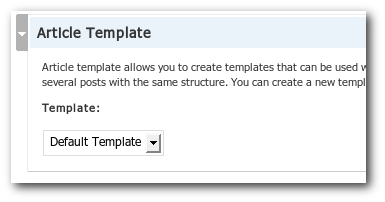
If a template is set as default, that will be inserted into the editor whenever you write a new post.
Please note that the templates can only be used by the user who created the template. This feature might be removed in the future versions.

Comments
Warning: Cannot modify header information - headers already sent by (output started at /home/website/public_html/wp-admin/admin-header.php:16) in /home/website/public_html/wp-includes/pluggable.php on line 391
It still makes the template but I thought you should know.
Warning: Cannot modify header information - headers already sent by (output started at public_html/wp-admin/admin-header.php:16) in public_html/wp-includes/pluggable.php on line 391
What does this mean?
Do you have a solution?
Christian
Please let me know when this plugin is updated, I am excited about the possibilities!
Warning: Cannot modify header information - headers already sent by (output started at /home/bdrecord/public_html/effectiveclassywebsites/testsite/wp-admin/admin-header.php:16) in /home/bdrecord/public_html/effectiveclassywebsites/testsite/wp-includes/pluggable.php on line 391
Here is my system information.
WordPress-Version : 2.3.2
WordPress-Db-Version : 6124
Role-Manager-Version : 02.02.01 (131585)
PHP-Version : 5.2.4
preg_replace : yes
Parse error: syntax error, unexpected T_OBJECT_OPERATOR in /home/yourh11/public_html/wp-content/plugins/article-templates/manage.php on line 34
Is this my error or in the scripting or whatever?
Parse error: parse error, unexpected T_OBJECT_OPERATOR in /wp-content/plugins/article-templates/manage.php on line 34
Is this because the plug-in is aimed at PHP5?
any ideas?
thanks,
-j
Cannot load article-templates/manage.php.
Craig
I was install it, but i wasn't see it on menu.
Tks
I am not sure what you mean.
I believe it handles plugins in a slightly different manner.
Working with Wordpress 2.5 (Just updated wordpress)
The only problem that I saw was that it inserts the option to choose the template below the Categories box just before Advanced Options, and it is difficult to find. I made some changes to your code to incorporate the same style box that all of the other options use (div id="postbox") and now it fits in seamlessly with all the other options on the page.
If you would like, I can zip up the changed files and send them to you.
When writing a new post, I choose the article template, and the code is inserted into the post textarea with the proper linebreaks between the lines of code (see below).
Question:
Insert question here
Answer:
Insert answer here
However, when I go to the Manage Templates tab and select "New post" next to one of the templates, the code that is inserted into the post textarea box all runs together and has the linebreak tags inserted (see below).
Question:
Insert question here
Answer:
Insert answer here
In looking at your code, you are using javascript to insert the template content in templates.php, which inserts the code correctly. In manage.php, you are not using that same javascript, so the html code is all running together.
Any ideas on what I can do to fix this issue?
Thanks in advance!
<?=__("Create New Template")?>I was install it, but i wasn't see it on menu.
I have the latest version of this plugin (1.04.0) installed on my WP 2.5.1 install, and it works just fine.
Make sure you have the latest version of this plugin. Once you have installed and activated it, navigate to the Manage tab in your WP admin, then look for a link called "Manage Templates". Click that and you should see a link on that page called "Create New Template" - click that link, fill in template title and the information you want to include on that article template, then click Save. It will take you back to the Manage Templates page where you should see your new template listed.
The Plugin works great.
When using in conjunction with Wordpress Admin Bar I had problems with the Admin Bar picking up the wrong link info so I had to modify this plugin as follows and all works fine. Not sure if I missed something and changed this when I didn't need to?
----- CODE ------
add_action( 'admin_menu', 'templates_add_menu_links' );
function templates_add_menu_links() {
$view_level= 2;
add_submenu_page( 'edit.php', __('Manage Templates'),
__('Manage Templates'), $view_level, // Modified by Chris Pike to make compatible with WP Admin Bar under WP2.5.1 (Manage/Managed Templates had the wrong link in) - 6th May 2008
'article-templates/manage.php' );
}
perfect.
regards
>> you can chose a template from the dropdown menu and it will be
>> inserted into the editor automatically.
No. No insert is done.
>> you can chose a template from the dropdown menu and it
>> will be inserted into the editor automatically.
No. Nothing happens. No automatic insert.
I think a great feature would be to override the category template.
I change your code php
[code]
<?=
//to
<?php echo
[/code]
Great plugin, and exactly what I was looking for.
I installed without a prob, got a template going witout prob. BUT... I have a really strange string attached only admin view of my blog.
So it's not showing to visitors but is distracting to work with this at the bottom of all post editing pages:
\n\n \n \n \n\n \n \n \n \n \n\n\n
\n\n
\n\n
\n\"Blog\ntitle=\"Blog jobs from across the internet\">\n
\nget_footer();\n?>\n\n
"}; addLoadEvent(function(){ document.getElementById("template").onchange=insertTemplate; var url = document.location.href; //Don't insert the default template in the templates section. if(url.indexOf("edit.php?page=article-templates\/template_form.php")+1) return; //Don't insert the default template in a edit page/post action if(url.indexOf("post.php?action=edit")+1) return; if(url.indexOf("page.php?action=edit")+1) return; //Setting the template in the URL as the default template. var match = url.match(/[\?\&]template=([^\&]+)/); if(match) { var template = match[1]; document.getElementById("template").value = template; insertTemplate('url'); return; } //If there is a default template, insert that var default_template = ""; if(default_template) { document.getElementById("template").value = default_template; insertTemplate('default'); } }); function insertTemplate(insertion_type) { template = document.getElementById("template").value; if(template == 'none') return; if(!all_templates[template]) return; if(window.tinyMCE && document.getElementById("content").style.display=="none") { //If there is any content in the text area, don't insert the template if(getText(tinyMCE.get('content').getContent())) { alert("Cannot insert template - content already present"); document.getElementById("template").value = "none"; return; } tinyMCE.get('content').setContent(all_templates[template].replace(/\n/g,"
")); } else if(document.getElementById("content")) { //If there is any content in the text area, don't insert the template if(getText(document.getElementById("content").value)) { alert("Cannot insert template - content already present"); return; } document.getElementById("content").value = all_templates[template]; } } function getText(str) { return str.replace(/<[^>]+>/g,'').replace(/\s/g,''); }
I'm using the latest version: Version 2.5.1
The thing is that I think it might have possibly worked when I first installed it.
I'd like to uninstall and try starting from scratch, but I'm not sure which tables are relevant to it in my DB?
What do you think the prob is?
Even if I try delete the template I started with and uninstall, is still shows that old template.
Binny, any help would result in a very happy me and huge happy points sent to you!
I'd love for it to work if you can help... but if not then I need to remove this template and go back to my old methods!
HEEEEELP! :)
Thanks,
Lilly Mouse
The problem was definitely not the plugin which is a superb idea!
I missed a piece of rogue php code in my index file and it was making the same layout appear even after I'd deleted the plugin! Cleared my cache! Even deleted my wp-cache file!
Dope!
Thanks Binny for all your support over email!
Ciao for now,
Lilly
I was actually trying to play with code with a purpose.
I wanted to create a Template in Admin --> User Id = 1
Set it as Default and wanted to make it default for all the users.
i tried to replace "current user" and "user" variables with 1 and play
i do get list of template as other user, but i dont get content of template
Regards
Link Exchange Guy :)
i think what i am gathering from my reading is
* we are using regular post with a different type i.e. template
* content by admin cant be edited or open in edit mode by user with contributor level ?
do you think we can do anything to solve this problem ?
Link Exchange Guy :)
got the code from you .. thanks :)
Mihir
Is there an example of a template code insert on your site?
I'm coming from a postnuke cms background so I am very familiar with templates etc, just do not know what variables and structure wordpress uses.
thanks for any help you can provide.
IN my current cms I wrote an html 'template' that pulls in a header graphic, has a few columns below that to include a thumbnail if available and also the 'news' content itself, followed by a footer graphic. I use to insert the article text that is input when creating an article, and for my thumbnail if there is one.
[Edit: HTML Code Removed]
I'm guessing your template engine does the same thing.
What I don't know is the actual variables I would input into the html code, to have it display the post itself in my table, or other variables for thumbnails etc.
Is there a 'global' wordpress list that is available for the variables? Or does your code use your own?
Templates that I had previously created now open up in html, and if I attempt to create new template I get the same results. I cannot view visual and lot of editing functions are not showing up. Can you please update for compatibility with WP 2.7 or let us know when you plan to update ?
Thanks
it shows up the title in 2 languages (german and english in my case), but I can´t enter content in the editor. its also impossible to switch language in the editor.
when I turn qtranslate off, it works fine. :-)
can you give me some hints what I have to change to make it work with qtranslate? (WP 2.7 / qtranslate 2.1.1)
I´m not a programmer, but hopefully with some tips I can do it with your help.
thanks for this nice plugin and thanks for your help :-D
freigeist
Your plugin is really great! Thanks a lot!
I wonder if you can make it work for multiple users of the same blog. I'll appreciate very much such as change!
Best Regards,
Mihai
How do i create a new template? there is no option anywhere to do this.
a, strong, em, b, i, code, pre, pandbrallowed. Other tags will be shown as code(< will become <). Urls, Line breaks will be auto-formated.