
Eventr - Event Registration Plugin for WordPress

Eventr, a Event Registration Plugin for WordPress lets you use your blog as an event management tool. You can create an event - the plugin will let people register for the event - it can also show a list of all the attendees. Once the event is done, you can deactivate the event and no more sign ups will be allowed.
Download
Features
- Create multiple events from the Admin side
- Show a registration form for the event at the client side
- Show an attendee list for each event in client side
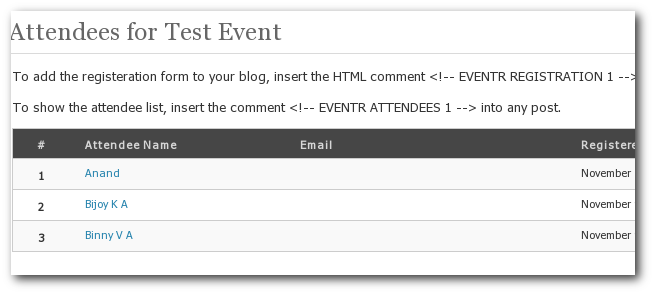
- See a list of all attendees for each event in the admin side - you can manage this list
- Set an event date - registration will stop after that date.
- Set maximum attendee limit for event. Registration will stop after that limit is reached.
- Registration Fields - Name, Bio, URL, Email, Phone, Image Upload fields
- All fields except the name can be turned off from the admin side
- Ability to export data in CSV format
- Optional Captcha protection for spam prevention
- And More...
Installation
- Download the zipped file from the Eventr page in Wordpress Plugin Repository.
- Extract and upload the contents of the folder to /wp-contents/plugins/ folder
- Go to the Plugin management page of WordPress admin section and enable the Eventr plugin
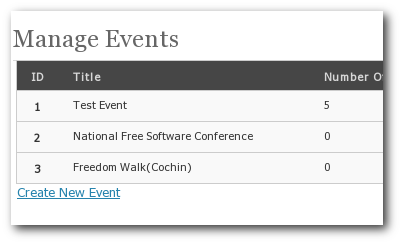
- Go to the Events Management page(Tools > Manage Events) to create or edit events.
Screenshots
See it in Action
I have set up a few demo pages - try it out...
Comments/Suggestion/Support Questions?
I have set up a forum called Eventr WordPress Plugin. Please use that to post your questions.

Comments
One trouble -- it borks when WP is installed in anything other than the root directory.
put comment for registration form on page or post in html mode not in visual mode.
the only thing thats missing, is a widget to insert this into the navigation.
my dream:
- a list of upcoming events in the widget
- click on an event and a new page opens where the registration form and the attendee list is available
- hovering over an event in the sidebar will show the attendee list
i am willing to help you programming this.. hit me back :)
Sorry, but I tried it in an install one level under root and it doesn't work. It should be easy enough to fix though. I'll give it a shot tomorrow.
/T
Kudos and Cheers... :)
Here's a link: www.eventbrite.com/t/how-to-use-ticket-widget
Hope you find it helpful!
Cool plug!
how can I change the required fields and the text landing page (the page that shows after I register)?
Also, is it possible for the landing page to have a hyperlink (for pdfs, videos, etc)
But it seems having some issue with wordpress 2.8.1 security - I'm unable to create/manage event anymore. It says I don't have permission to access the page though I'm already have administrator role. Any plan to make it compatible with 2.8.1?
"You do not have sufficient permissions to access this page." when i Create New Event
My version is 2.8.1
I am using WP 2.8.4
Thank you for your work with this, it really helps me a lot!
"You do not have sufficient permissions to access this page."
What i have to do create the event and registration form for the events
Thirunavukkarasu
I'm to translate your plugin in russian language. when You publish this? Please answer me to email! Thanks!
nice idea...the next version should be good.
When i post a name in the event, and go to my administrations page the name is shown 2 times. Why is taht, and what do i do to prevent that. I use the latest version of WP
Seems that a (browser) refresh of the registration page causes the same attendee_id to get inserted twice...
I have an question
is there a option to auto update your event page without changing de event id every time ?
Cheers
I am using WP 2.8.6
What to do??
Thanks!
Brian
Thanks,
You don't have permission to access /Sekolah/wp-admin/< on this server
On the attendees list, there is no limit to the number of character that can be entered for an email address, name, phone number. So since I have such a long name and email address it pushes the uploaded image into the side bar. If I remove the entries that have long names it fixes the problem. Or if I remove listing the phone number it corrects it. Is there a way to set it so it wraps the text in the field, so that the attendees list stays in the designated space?
Thanks again for all that you do.
-Craig, Arkansas, USA
Thanks in advance.
KDB
Also, your demo seems to be closed.
Thanks!!!
I have an event here I need to ask if the recipient has any dietry requirements.
Is this possible?
Thanks!
and --> after. Changing the options settings in the file eventr.php from 1 to 0 did nada, oddly.
great plugin, I use it on my scuba website. (http://www.duikteameindhoven.nl)
1 question: is it possible to only let registered users register for events?
Regards,
Bart
[EVENTR REGISTRATION 1]
in a post
where 1 is the no. of your event, if it's the first event, it's 1
and to place a list of attendees in that post
place
[EVENTR ATTENDEES 1]
below that
a, strong, em, b, i, code, pre, pandbrallowed. Other tags will be shown as code(< will become <). Urls, Line breaks will be auto-formated.